APK.GOLD
Apk files for Android
Short info
In general apk file ScreenShare (tablet) has rating is 5.9 from 10. This is cumulative rating, most best apps on google play store have rating 8 from 10. Total reviews in google play store 75. Total number of five star reviews received 32. This app has been rated like bad by 35 number of users. Estimated number of downloads range between 10,000+ in google play store ScreenShare (tablet) located in category Communication, with tags and has been developed by Spring Design INC.. You can visit their website http://www.springdesign.com or send support@springdesign.com to them. ScreenShare (tablet) can be installed on android devices with 2.3(Gingerbread)+. We provide only original apk files. If any of materials on this site violates your rights, report us You could also download apk of ScreenShare (tablet) and run it on android emulators like bluestacks or koplayer. Versions of ScreenShare (tablet) apk available on our site: 1.0.8, 1.0.3. Last version of ScreenShare (tablet) is 1.0.8 was uploaded January 27, 2019
Screenshots of ScreenShare (tablet)
  • ScreenShare (tablet)
  • ScreenShare (tablet)
  • ScreenShare (tablet)
Description of ScreenShare (tablet) (from google play)

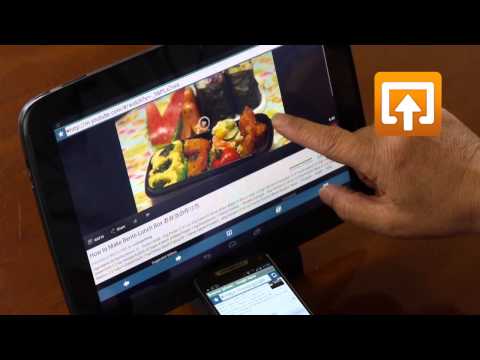
ScreenShare enables wireless sharing of videos, music, photos, web pages and many types of documents from your phone to your tablet.

This app is offered free of charge in order to serve as a reference implementation for Spring Design and its parent company’s patents with multi-screens applications. Spring Design’s issued patent numbers can be seen at www.springdesign.com

This is a full release and has no ads. ScreenShare works as a pair. We require it to be installed on both your tablet and your phone in order to share screen and content between devices.

ScreenShare includes two major mini-apps: ScreenShare organizer and ScreenShare browser. ScreenShare organizer can let you share and play your phone contents (photos, videos, music, documents, etc.) to your tablet or TV (via HDMI cable) and export your phone contents to your tablet storage. ScreenShare browser is highly recommended by TabletPCReview: "With ScreenShare Browser, you don't have to be in range of a Wi-Fi signal to get your tablet online. .... The app's performance is rock solid.”

This product does NOT have a remote desktop function or mirroring. ScreenShare has unique benefits: both tablet and phone devices can have distinct screen outputs and inputs to access content on the phone concurrently.

Note:

* When you want to stream video or download large files in ScreenShare Browser via the ScreenShare service, we recommend that you to switch the ScreenShare connection to Wi-Fi (phone and tablet connect to the same Wi-Fi network or connect the tablet to the phone's mobile hotspot.)
* Supports HTTPS for Android 3.0+ devices.

Keywords: Share remote device content, wireless media sharing, dual screen apps, two-way input streaming or beaming, Air Droid and AirPlay

Version history ScreenShare (tablet)
New in ScreenShare tablet 1.0.8
Fixed some bugs.

***Notice:
1.Both your phone and tablet must install the newest versions to keep normal running .
2.It is better if you can uninstall the previous version and then install the new one.
Advertisement
Please rate this app
More info

PermissionsScreenShare (tablet) 1.0.8

Read the alerts below before you install

  1. No alerts
  2. Worth checking
  3. High risk

Alerts

Worth checking (2)

  • Display over other appsSYSTEM_ALERT_WINDOWDraws on top of other apps
  • Modify system settingsWRITE_SETTINGSChanges brightness, ringtone and other settings

22 permissions in total

Source: AndroidManifest.xml of this APK

Switched on in Settings2
  • Display over other appsCan appear on top of other apps or other parts of the screen. This may interfere with normal app usage.
  • Modify system settingsAllows the app to modify the system's settings data. Malicious apps may corrupt your system's configuration.
Needs your OK4

Location

  • Access approximate location only in the foreground
  • Access precise location only in the foreground

Files

  • Read the contents of your shared storage Android 4.1+
  • Modify or delete the contents of your shared storage
Given at install16
  • Access Bluetooth settings
  • Change network connectivity
  • Check the Google Play license
  • Connect and disconnect from Wi-Fi
  • Have full network access
  • Install shortcuts Android 4.4+
  • Pair with Bluetooth devices
  • Prevent phone from sleeping
  • Read your Web bookmarks and history up to Android 6.0
  • Reorder running apps
  • Retrieve running apps
  • Run at startup
  • Set wallpaper
  • View network connections
  • View Wi-Fi connections
  • Write web bookmarks and history up to Android 6.0

Device must have

Any Android device will do

Permission changes

The list has not changed since version 1.0.3.

Android Version Requirements for ScreenShare (tablet)

How the minimum Android version needed by ScreenShare (tablet) has changed across the versions in the apk.gold catalog. Tap a point on the chart to check a specific version.

1.0.8Jan 27, 2019Android 2.3+, target 8.0
Minimum AndroidTarget AndroidLast update: Jan 2019

The current ScreenShare (tablet) 1.0.8 runs on Android 2.3 and later and targets Android 8.0.

Other ScreenShare tablet APK versions for android 14
Popular android apps